AntiX vs Puppy Linux - Which One Is Better?
Date First Published: 21st April 2026
AntiX and Puppy Linux are both great choices for restoring very old PCs and laptops. We put these two lightweight Linux distributions side-by-side to determine which one is actually better for your hardware.
Performance and Speed
Both antiX and Puppy Linux are lightweight Linux distributions designed for very limited hardware, but they achieve their speed through different methods. Puppy Linux is generally faster in daily operation because it runs entirely in the memory, though it can be configured to run from a hard drive. This makes it better for USB booting rather than permanently installing it on a hard drive.
AntiX is more efficient at managing limited resources and offers better compatibility with very old 32-bit CPUs. While it can run on Pentium 3 processors from the early 2000s, modern web browsing on these processors will likely be too slow due to heavy JavaScript and media rendering.
Both distributions use around 250 to 300 megabytes of memory at startup and at least 1 gigabyte of memory is recommended for a comfortable experience. However, antiX is optimised for performance on old computers while providing a more traditional, stable Debian-based experience.
Setup and Installation
AntiX has an easier and more standard installation process than Puppy Linux. It provides full access to Debian stable repositories, making software installation reliable using the Synaptic Package Manager or command line. It's more stable and predictable, making it a better choice for someone who wants a set-and-forget system, especially for non-technical users.
Puppy Linux is generally considered easy to install for users familiar with basic computing, but it differs from traditional operating systems. The standard, recommended installation method is a frugal install, which places all files in a single folder, allowing for high-speed operation. It comes with pre-installed tools, such as the Puppy Universal Installer, that guide you through the process. While some users find it straightforward, others may find the partitioning process required for a dedicated hard drive installation to be more complex.
User Interface and Ease Of Use
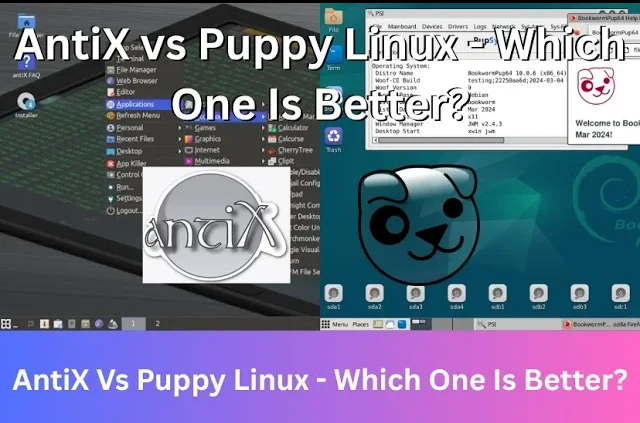
antiX is generally more conventional and easier for users familiar with traditional Windows. It provides a familiar desktop layout with a taskbar, menu, and desktop icons. It strongly resembles the classic lightweight look and feel of Windows XP or Windows 2000. The Full version comes with web browsers, word processors, and utilities designed for older machines.
It also has a Control Centre, which centralises all configuration and maintenance tools to manage settings like WiFi, Sound, and display without needing to use the command line. Overall, the appearance is functional and minimalist. It prioritises speed over complex visual effects.
Puppy Linux also has a centralised configuration system, often referred to as the Puppy Setup or Control Panel. It is generally accessed via the main menu under Menu, Setup to manage system settings, networking, and appearance. Instead of a single window like Gnome or Windows Control Panel, Puppy often uses a menu-driven approach organised by category to keep the operating system lightweight.
However, Puppy Linux often defaults to a single-click to open files and folders, rather than the standard double-click, which can take time for new users to get used to. It also operates differently from most Linux distributions, mainly by running as the root user by default. This provides full control but also carries potential risks. On shutdown, it asks to save sessions into a file or folder, allowing for portability. This can be confusing for beginners but it's powerful for enthusiasts. Some users may not recommend it for those entirely new to Linux, as the single-user root setup can make it easy to break parts of the system.
Window Managers
To save system resources, Antix and Puppy Linux don't use a full desktop environment like gnome or KDE. Instead, they use lightweight window managers. AntiX uses IceWM by default, a very light but traditional window manager. It offers other options, including Fluxbox, and JWM, allowing you to switch depending on how low you need to go on resources.
Puppy Linux mainly uses the JWM window manager. The interface is highly customisable, allowing for changes to themes, fonts, and wallpapers, but often appears dated compared to other Linux distributions. It often feels more niche or specialised than antiX. The desktop tools, menu structure, and file management are designed for maximum speed and minimal resource overhead, rather than mimicking a traditional desktop operating system.
Should I Use Antix Or Puppy Linux?
Choosing between antiX and Puppy Linux depends on how you plan to use your computer and the specific hardware you have. Both are great for restoring very old hardware, but they take very different technical approaches. AntiX is generally best for permanent installation on a hard drive for daily use. It feels more like a standard operating system once installed. Because it's based on Debian Stable, you can install almost any standard Linux software using the apt command or Synaptic package manager. Overall, it's one of the best Linux distributions for giving new life to computers over 20 years old, often running on machines with very limited resources, such as Pentium 3 processors and as little as 256 megabytes of RAM.
Puppy Linux is more aimed at portability on a USB stick. It can run entirely from a USB stick and actually allows you to remove the USB after it boots into RAM. This is ideal if your hard drive has failed. It's perfect for booting into a crashed PC to recover files or fix a broken bootloader. Since it runs from RAM, application launch times are nearly instant, making a machine with 1GB or 2GB of RAM feel surprisingly fast. Any changes you make can be saved to a "save file" on your USB, keeping your main computer's hard drive untouched.
Comments
About Us
-
We offer guides, tutorials, and reviews about the world of information technology. Whether you're a tech enthusiast, a professional, or a beginner, our goal is to inspire you and guide your tech journey. Subscribe to stay updated with the latest videos and explore the exciting world of computing and information technology.
Recent Articles


Recent Quizzes
Subtopics
Network Services Network Setups Network Standards Network Hardware Network Identifiers Network Software Internet Protocols Internet Organisations Data Transmission Technologies Web Development Web Design Web Advertising Web Applications Web Organisations Web Technologies Web Services SEO Threats To Systems, Data & Information Security Mechanisms & Technologies Computer Hardware Computer Software Ethics & Sustainability Legislation & User Data Protection