Microsoft Extends Windows 10 Security Updates To October 2027
Date First Published: 5th July 2026
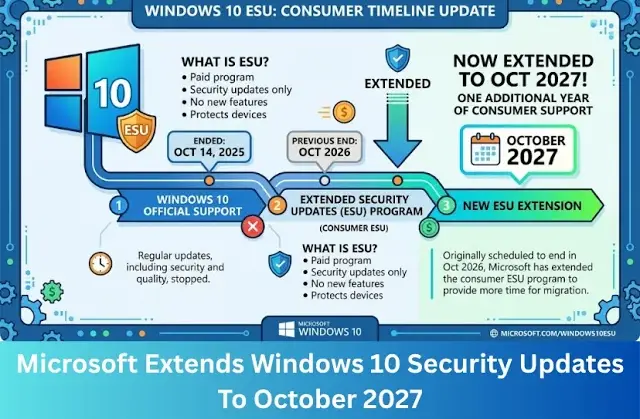
Windows 10 extended updates were scheduled to end on 13th October 2026, but Microsoft has quietly extended this for another year without an official announcement on its website. If you're staying on Windows 10, you will now receive a second year of important security patches, but not new features. In this video, we will explore the current status of Windows 10 and how to receive the security updates.
Current Status Of Windows 10
Windows 10 reached its end of official support on 14th October 2025. To receive security updates after October 2025, you will need to be enrolled in the extended updates program. Microsoft has quietly extended this program, ensuring that critical updates remain available until 12th October 2027, a year beyond the original cut-off date.
As of 2026, Windows 10 still has a market share of over 25%. The end of support for Windows 10 is creating an e-waste problem. Hundreds of millions of PCs are at risk of being discarded prematurely, not because the hardware has failed, but due to software-driven obsolescence. Many perfectly functional older PCs are blocked from the upgrade due to strict CPU and TPM restrictions. If these computers are thrown away, it translates to hundreds of millions of kilograms of e-waste entering landfills.
By increasing system requirements and letting the operating system become heavier in a way that cuts off security updates for older hardware, Microsoft creates an artificial demand for new computers and RAM sticks. It's artificial because most of the affected computers are perfectly capable of everyday tasks. Many are used for browsing the web, checking emails, and streaming media, where newer, more powerful hardware isn't strictly necessary. Microsoft has just decided to require certain hardware to meet specific Windows 11 requirements, which effectively makes a large portion of computers become obsolete.
However, there are workarounds using tools like Rufus, which allow you to bypass RAM, Secure Boot, CPU, and TPM checks, allowing you to create a customised, bootable Windows 11 USB drive. While these can function, Microsoft introduced new restrictions in the 24H2 update which blocked CPUs lacking SSE 4.2 from booting the latest versions of Windows 11. This mainly locks out Intel Core 2 Duo and Core 2 Quad processors, as well as early Celeron and older AMD CPUs. On these processors, you will be stuck on Windows 11 version 23H2 and won't be able to upgrade to 24H2 or later versions.
Fortunately, you don't need to discard your hardware. These devices can be kept secure and fully functional through 2027. If you're planning to stay on Windows 10, Microsoft has pushed back the end of extended updates to 12th October 2027. If Windows 10 remains widely used, Microsoft could push another year's updates until October 2028 as enterprise and education subscriptions are already structured to run for three years.
But, these updates are only designed to be a temporary solution. Eventually, the Windows ecosystem will lock out older hardware entirely. If you want long-term support, switching to Linux is an excellent strategy to future-proof your device. Distributions like Linux Mint or Lubuntu are secure and require much less RAM and processing power, immediately bypassing Windows-specific hardware restrictions. Most daily tasks, like web browsing, word processing, and streaming run more securely and faster than they would on Windows. By switching to Linux, you bypass the software death sentence that forces most people to throw away old computers. Linux distributions will provide updates for your computer long after Microsoft has moved on.
How To Enrol?
For personal use, the ESU program has remained the same since it was first introduced in 2025. It can be effectively accessed for free by simply logging into Windows 10 with your Microsoft account or by sinking your settings and files to OneDrive. You can also cash in 1000 Microsoft reward points. To qualify for extended updates, your computer will need to be running the latest version of Windows 10. If you're signed in with a Microsoft account and have already backed up your files to the cloud, you will automatically qualify for free ESU.
For commercial and educational organisations, the ESU is offered as a paid annual subscription. Year One pricing starts at 61 US dollars per device, with costs doubling for each consecutive year.
Once you've enrolled, you will be able to download and install these updates through the normal Windows Update in Settings. Microsoft has been providing security updates for Windows 10 ESU enrolled devices every month and hasn't missed a Patch Tuesday. This shows consistent commitment. Microsoft Defender will continue to work on Windows 10 and Microsoft has confirmed that the built-in antivirus will continue to receive security intelligence and malware definition updates until October 2028. This will keep your device protected against the latest security threats.
Comments
About Us
-
We offer guides, tutorials, and reviews about the world of information technology. Whether you're a tech enthusiast, a professional, or a beginner, our goal is to inspire you and guide your tech journey. Subscribe to stay updated with the latest videos and explore the exciting world of computing and information technology.
Recent Articles




Recent Quizzes


Subtopics
Network Services Network Setups Network Standards Network Hardware Network Identifiers Network Software Internet Protocols Internet Organisations Data Transmission Technologies Web Development Web Design Web Advertising Web Applications Web Organisations Web Technologies Web Services SEO Threats To Systems, Data & Information Security Mechanisms & Technologies Computer Hardware Computer Software Ethics & Sustainability Legislation & User Data Protection