Puppy Linux vs Lubuntu - Which One Is Better?
Date First Published: 22nd July 2026
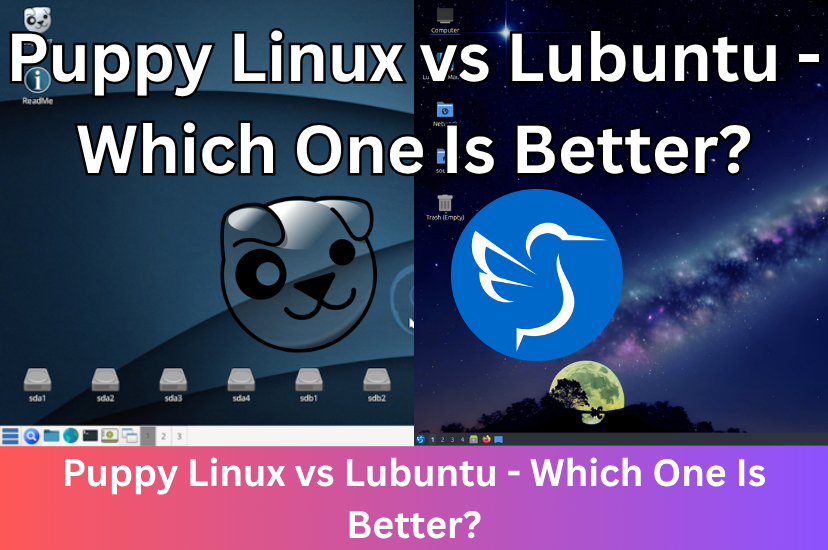
Puppy Linux and Lubuntu are two of the best Linux distributions for reviving old or low-spec hardware, but they target different levels of hardware capability and user experience. In this video, we will compare Puppy Linux and Lubuntu to help you discover which one you should install.
System Requirements
Lubuntu is a fully-featured operating system with a desktop environment. It's essentially a lightweight, resource-saving version of standard Ubuntu. It requires at least 1 gigabyte of RAM and a 64-bit processor, though 2 gigabytes is recommended for a comfortable experience. The absolute minimum disk space required to install Lubuntu is 8 gigabytes, although 20 gigabytes or more is highly recommended to allow room for software updates and personal files.
Puppy Linux is designed for ultra-low resource hardware. While its memory usage depends on the specific version you choose, modern 64-bit versions generally require only about 600 megabytes of RAM, while 32-bit versions require around 300 megabytes. For the best experience, a system with at least 1 to 2 gigabytes of RAM is recommended.
Puppy Linux requires very little space, typically just 1 gigabyte, depending on the specific Puppy version. However, at least 5 to 10 gigabytes of free space is recommended. This gives you enough room to create a save file or folder to store your personal files, browser cache, and recently installed apps.
User Interface
Lubuntu uses the LXQT desktop environment. It provides a familiar layout to Windows with a standard start menu, taskbar, and pre-installed apps like a web browser and office suite, making it a better choice for beginners. Standard applications are neatly categorised, and navigating the system feels like a modern operating system. But, it has made some changes to its desktop environment. In late 2018 with version 18.10, Lubuntu replaced its LXDE desktop with the more modern LXQt desktop environment. While still light, LXQt is more demanding than the older LXDE.
To keep resource usage as low as possible, Puppy Linux doesn't use a standard desktop environment. Instead, it uses Joe's Window Manager by default, which strips down graphical effects and fancy animations, mimicking the look of early Windows versions. It prioritises speed over fancy animations. The menus can feel slightly cluttered, and many default apps have less conventional names, like Abiword instead of LibreOffice which can confuse beginner users. Because Puppy Linux is not just one operating system, the layout can vary depending on which version you download, but it typically features a taskbar at the bottom and a small, customisable space.
Setup and Ease Of Use
Compared to Puppy Linux, Lubuntu is more traditional and much easier to use for beginners. Lubuntu comes with a standard, easy-to-use graphical installer and installs normally to your hard drive. If you're a beginner, looking for an everyday operating system, the graphical installer will feel user-friendly and it doesn't require as much manual configuration during setup. It comes complete with a start menu, taskbar, and pre-installed modern applications like Firefox and LibreOffice. Most users familiar with Windows can use it without any major adjustments.
Puppy Linux is less conventional. When you boot it up, the entire operating system copies itself into your computer's memory and runs from there rather than from your hard drive, which can make saving files and configurations confusing for first-time users. Once the operating system is loaded into RAM, you can safely remove the USB stick or CD you used to boot the computer. Because RAM is volatile memory, anything you do inside the operating system is wiped out when you turn your computer off. To save your files and settings, Puppy Linux will ask you if you want to create a save file or save your session to an external USB drive when you shut down. But, you can choose to install permanently to your hard drive if you want. The Puppy Linux community heavily recommends the Frugal install method for most users, which copies the exact same core files from the USB to your hard drive, but it creates a specific save folder to keep track of your personal settings and installed apps. The interface is basic and very different from mainstream Linux distributions, relying heavily on a right-click menu system. It comes with its own suite of simple, built-in utilities rather than standard desktop apps.
Lubuntu follows the traditional multi-user Linux setup, allowing you to create different user accounts with varying permissions. Puppy Linux doesn't use traditional user accounts entirely and runs the whole system as the "root" (administrator) user by default. While this makes it impossible to be locked out of your own files, it removes the standard security safeguards meant to protect beginners from accidentally deleting important system files.
Software Manager
Puppy Linux and Lubuntu use very different software management systems tailored to their specific architectures and design goals. Built on top of Ubuntu, Lubuntu gives you access to the massive Ubuntu software ecosystem. You can easily find and install apps with a single click using the graphical Discover Software Center. You have direct access to the massive Ubuntu repositories, which include thousands of tested, ready-to-install applications.
Puppy Linux uses its own Puppy Package Manager, a utility designed to conserve system resources while supporting multiple package formats. It primarily handles its own native packages, but it can also process Debian and rpm files. You can configure the package manager to fetch software from official Puppy repositories, as well as from compatible Slackware or Ubuntu repositories, depending on which version of Puppy Linux you are using. It's very light and requires no heavy background services. However, managing the background files an app needs to run can sometimes be tricky compared to mainstream Linux distributions.
Should I Use Puppy Linux or Lubuntu?
If you're a beginner looking for an everyday operating system that works out of the box for browsing the web, playing media, and doing basic word processing without trouble, and your computer has at least 2 gigabytes of RAM, Lubuntu is the better choice. It's designed to be much more familiar if you're switching from Windows with the LXQT desktop environment and graphical installer.
Choose Puppy Linux if you're trying to revive a very old computer with 2 gigabytes RAM or less. It's designed to be a very portable system that runs in your RAM and bypasses slow hard drives, making it perfect for hardware recovery if you're comfortable with a unique, retro desktop environment and willing to learn how its specific utilities work. It can run fast even on hardware from the early to mid 2000s where modern operating systems would freeze.
Comments
About Us
-
We offer guides, tutorials, and reviews about the world of information technology. Whether you're a tech enthusiast, a professional, or a beginner, our goal is to inspire you and guide your tech journey. Subscribe to stay updated with the latest videos and explore the exciting world of computing and information technology.
Recent Articles

Recent Quizzes
Subtopics
Network Services Network Setups Network Standards Network Hardware Network Identifiers Network Software Internet Protocols Internet Organisations Data Transmission Technologies Web Development Web Design Web Advertising Web Applications Web Organisations Web Technologies Web Services SEO Threats To Systems, Data & Information Security Mechanisms & Technologies Computer Hardware Computer Software Ethics & Sustainability Legislation & User Data Protection