Linux Mint XFCE Vs Xubuntu - Which One Is Better?
Date First Published: 29th August 2026
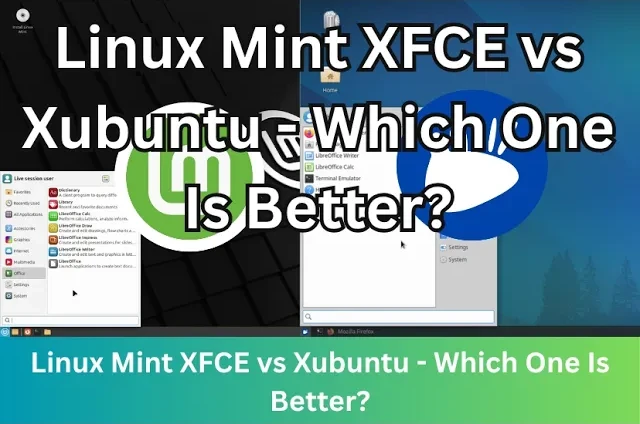
Linux Mint XFCE and Xubuntu both use the XFCE desktop environment on top of an Ubuntu base, making them both fast and lightweight. In this video, we will compare Linux Mint XFCE and Xubuntu to see which is more beginner-friendly, faster, easy to use, and efficient.
Beginner-Friendly
Linux Mint XFCE is generally more beginner-friendly than Xubuntu. It includes more tools out of the box. It comes with its own custom Update Manager to install updates, Timeshift to manage backups, and tools to install drivers and media codecs so it feels complete after you install it. These don't require command-line knowledge.
Xubuntu relies on standard Ubuntu system tools. The experience is closer to a stock XFCE experience, but it requires more manual setup for drivers and media codecs, so it has a slightly steeper learning curve for beginners. However, it still features a standard application menu, taskbar, and system tray, making the transition easy. Because it is built on Ubuntu, you can easily find guides, tutorials, and forums to solve problems.
Linux Mint XFCE features a customised version of the XFCE desktop that looks immediately like a classic Windows desktop after booting. It comes with a classic start menu and taskbar. Xubuntu requires more manual tweaking to achieve this. By default, the taskbar is positioned at the top, which can be confusing for beginners, and it lacks the custom welcome tools found in Mint, but XFCE is a very customisable desktop environment, so you can tweak it to your preferences. The setup process in both Linux Mint XFCE and Xubuntu uses a clear, step-by-step graphical installer that lets you test the system by running it on your USB drive before you install it to a hard drive.
Software Manager
Linux Mint has its own software manager optimised for speed and user reviews specific to the community. To improve system control and performance, it blocks Snap packages by default and promotes Flatpak as its preferred packaging format, which is open-source and not fully controlled by Canonical. Xubuntu uses the Snap Store, which can feel slow to load and it's more prone to glitches and other performance issues because of package catalogues.
While standard installations include Snap out of the box, you can remove the framework and its background processes using terminal commands if you prefer relying on traditional apt packages. Because Xubuntu uses the Xfce desktop environment, it relies much less on core Snap components than standard Ubuntu. If you do this, it will uninstall apps originally provided as snaps, including Firefox. You will need to install an alternative version like a Flatpak, to keep using them. Linux Mint completely disables Snaps out-of-the-box and prefers Flatpaks, which don't run constant background services unless an app is actively open.
Customisation
Both Linux Mint XFCE and Xubuntu use the same desktop environment, giving you access to the same panel settings and window managers, but they have a different appearance and customisation tools. Mint provides a heavily branded, Windows-like layout with custom themes you can choose from. It features the custom Mint theme suite, allowing you to easily change the colours, icons, and switch between light and dark themes. Xubuntu keeps things closer to the stock XFCE layout with blue highlights in the taskbar. Any visual tweak possible in Mint XFCE can also be achieved in Xubuntu. You can install the exact same XFCE themes on both Mint XFCE and Xubuntu and they will work identically.
Resource Usage
Both Linux distributions have very similar idle RAM usage at boot, usually ranging between 600 and 800 MB. The difference is rarely noticeable, but Xubuntu can sometimes boot with slightly less memory overhead. This is because Linux Mint XFCE includes extra background services and tools that slightly increase its baseline resource footprint. However, Xubuntu relies on Ubuntu's base which activates background services to check for system and application package updates multiple times a day. This adds background memory overhead but it can be removed if you don't use Snap packages. Both sit under 2 to 3% CPU usage when idle on most computers. Once you open apps, like web browsers, the resource usage between Linux Mint XFCE and X Ubuntu becomes minimal. Xubuntu and Linux Mint XFCE both require at least 11 to 13 GB disk space for a clean installation, making their disk footprints nearly identical. The difference between the disk space usage is minimal and it depends more on the packages you choose to install.
Should You Use Linux Mint XFCE or Xubuntu?
Both operating systems use the XFCE desktop and share the same Ubuntu core, making them both fast for older computers. However, they differ in a few ways. If you want a more beginner-friendly experience out of the box, choose Linux Mint XFCE. It comes with custom themes, its own update and software manager, it disables Snap packages by default, and comes with pre-installed media codecs. This makes it better if you're new to Linux and want your computer to work instantly with system tools and a familiar layout to Windows. Xubuntu is a better choice if you prefer the Ubuntu ecosystem and want a completely bare-bones starting point. It offers a simpler, more minimal XFCE implementation, which is ideal if you want a less cluttered desktop and prefer building up your desktop environment yourself.
Comments
About Us
-
We offer guides, tutorials, and reviews about the world of information technology. Whether you're a tech enthusiast, a professional, or a beginner, our goal is to inspire you and guide your tech journey. Subscribe to stay updated with the latest videos and explore the exciting world of computing and information technology.
Recent Articles

Recent Quizzes
Subtopics
Network Services Network Setups Network Standards Network Hardware Network Identifiers Network Software Internet Protocols Internet Organisations Data Transmission Technologies Web Development Web Design Web Advertising Web Applications Web Organisations Web Technologies Web Services SEO Threats To Systems, Data & Information Security Mechanisms & Technologies Computer Hardware Computer Software Ethics & Sustainability Legislation & User Data Protection