Linux Distros: Ubuntu vs Kubuntu vs Xubuntu vs Lubuntu - Which One Is Better?
Date First Published: 28th April 2026
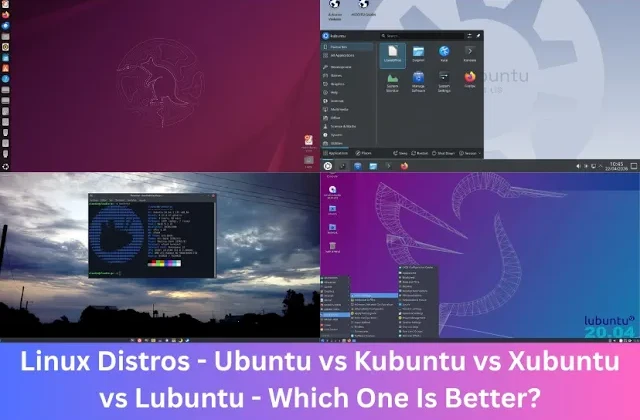
All four Linux distributions are based on the same Ubuntu core, offering identical software repositories and stability, but they differ mainly by their default desktop environment and resource usage. We compare these four editions so you can see which one is most suitable for your needs.
Ubuntu (Default)
Ubuntu is the default version designed for modern PCs with over 4 GB RAM. The interface is polished, comes with a centred, vertical dock approach, and focuses on productivity with features like Activities overview for managing workspaces and an efficient app search. It uses a customized version of the gnome desktop environment. The design is polished and workflow-oriented, featuring gesture-based navigation, a customisable dock, and a dark mode-friendly look.
It's generally more resource-intensive than other editions. While capable, standard Ubuntu can feel slow on older hardware. It uses complex graphics which require a lot of CPU resources and uses around 1.5 to 2 GB RAM at startup to keep the desktop and background services running, sometimes performing similar to Windows 10.
However, Ubuntu has much less telemetry than Windows 10 and 11. Ubuntu's data collection is minimal and strictly opt-in, while Windows 11 features extensive, often opt-out, data collection. Ubuntu focuses on user privacy, requiring explicit permission to collect data.
Kubuntu
Kubuntu uses the KDE Plasma desktop, providing a customisable interface that can be tailored to look like Windows. If you want to have more control over the appearance of the desktop, Kubuntu is a better choice over standard Ubuntu. Because it uses the KDE Plasma desktop environment, you can make changes to almost every visual element, including themes, icons, widgets, panel layouts, and window behaviors, without needing to edit code. It can run efficiently on both modern and older hardware. While it's heavier than lightweight options like Xubuntu, it uses less RAM than Ubuntu. The default layout is user-friendly for Windows users, featuring a bottom taskbar, start menu, and system tray, making it easier to transition.
Xubuntu
Xubuntu uses the XFCE desktop, offering a lightweight, and efficient experience. It's ideal for old PCs and users seeking a traditional, faster, and less intensive desktop. It offers a classic, Windows-like desktop layout with a standard panel and menu and you can customise panels, menus, and themes easily. It's much lighter than standard Ubuntu, using around 600 to 800 MB RAM at startup, but slightly heavier than Lubuntu. It requires a minimum of a gigabyte of RAM, though at least 2 gigabytes is recommended for a comfortable experience. This makes it ideal for extending the life of most old computers with 2 to 4 GB RAM which can't run Windows 11 or for those seeking a stable, easy to use operating system.
Lubuntu
Lubuntu is the most lightweight and fastest option. It uses the LXQt desktop, making it the most lightweight and fastest option, perfect for very old or low-power hardware. It uses around 500 to 600 MB RAM at startup and the system can boot with as little as 512 MB ram. It has similar system requirements to Xubuntu. It requires a 64-bit processor and at least 1 gigabytes of RAM. It comes with essential applications for daily use and it's customisable, especially concerning its appearance and layout, due to its use of the lightweight desktop environment and Openbox window manager. While aimed at older hardware, modern Lubuntu is designed to be snappy on any machine, including modern computers where speed is preferred over heavy visual effects.
While it's user-friendly, the interface of Lubuntu can feel dated, as it's designed for very high resource efficiency and speed on older hardware, rather than modern aesthetics. The most recent versions of Lubuntu use the LXQt desktop environment, which is more modern than the previous LXDE, but it still maintains a very basic layout.
Which Linux Distro Should You Choose?
Which edition of Ubuntu you should use depends on your preferences and the capabilities of your hardware. Choose standard Ubuntu if you're using modern hardware, have at least 4 GB RAM, or prefer a more modern, vertical, search-based workflow. Ubuntu often provides better performance, faster boot times, and better resource management compared to Windows 11, which often uses over 3 GB RAM just to keep the desktop and background services running. Choose Kubuntu if you prefer a Windows-like layout, you want extensive customisation options, or want a lighter interface for older hardware. Both distributions share the same excellent community support and release schedules.
Xubuntu and Lubuntu are great choices for restoring old or limited hardware which can't be upgraded to Windows 11. Lubuntu is slightly faster and lighter, making it ideal for very old hardware with less than 2 GB RAM because it uses the LXQt desktop. Xubuntu is ideal if you have slightly better hardware with 2 to 4 GB RAM. It's slightly heavier but it offers a more polished and traditional experience by using the lightweight XFCE desktop environment, balancing performance with usability.
Comments
About Us
-
We offer guides, tutorials, and reviews about the world of information technology. Whether you're a tech enthusiast, a professional, or a beginner, our goal is to inspire you and guide your tech journey. Subscribe to stay updated with the latest videos and explore the exciting world of computing and information technology.
Recent Articles



Recent Quizzes


Subtopics
Network Services Network Setups Network Standards Network Hardware Network Identifiers Network Software Internet Protocols Internet Organisations Data Transmission Technologies Web Development Web Design Web Advertising Web Applications Web Organisations Web Technologies Web Services SEO Threats To Systems, Data & Information Security Mechanisms & Technologies Computer Hardware Computer Software Ethics & Sustainability Legislation & User Data Protection