Linux Mint vs Antix - Which One Is Better?
Date First Published: 30th March 2026
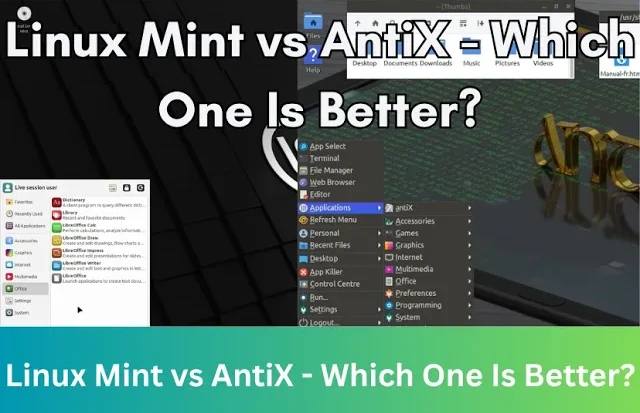
If you're trying to restore an older computer or looking for a lightweight Linux distribution that will make it usable again, Linux Mint and AntiX are both good choices. We compare Linux Mint and antiX to see which is faster, easier to use, and better for restoring old hardware.
Installation and Ease Of Use
Linux Mint is generally easier to install and use, offering a polished experience suitable for beginners and modern hardware. The installer is straightforward and user-friendly, making it suitable for newcomers. It provides a polished graphical interface immediately after booting the live media and uses a full desktop environment with modern icons, shadows, and smooth menus. You will find easy-to-use graphical tools for customising panels, themes, and applets, so it's ideal if you're looking for a modern experience similar to Windows.
The AntiX installer is less polished and slightly more complex than Mint's and requires a bit more knowledge, particularly for partitioning. However, it offers a live environment that allows for testing on older hardware easily. AntiX uses very light window managers rather than a full desktop environment to maximise the speed on older hardware. It's still very customisable, but usually requires editing text configuration files rather than using a graphical tool.
Resource Usage (RAM and CPU)
AntiX is much more lightweight than Linux Mint, using around 200 to 300 megabytes of RAM at startup. Linux Mint XFCE typically uses around 600 to 800 megabytes, while the Cinnamon edition often uses over 1 gigabyte.
AntiX is designed for very old hardware. It can run on systems with as little as 256 MB RAM and a pentium 3 processor. It's one of the few Linux distributions that still supports 32-bit processors. If you're trying to restore a computer that originally came with Windows Vista or XP and has less than 2 gigabytes of ram, antiX is the better choice. While the operating system itself should run smoothly, web browsing on very old processors may be slow due to the demands of modern, heavy websites.
Linux Mint requires a minimum of 2 GB RAM and a 64 bit processor, though 4 GB is recommended for comfortable browsing and daily tasks. The desktop environment is heavier than AntiX, but the XFCE environment is designed to be light on resources. If you're looking to extend the life of a computer which originally came with Windows 7, 8, or 10, Linux Mint will likely work well. It's much less resource intensive than Windows. Windows 10 and 11 constantly run background tasks like telemetry, Windows Update, anti-malware scans, and search indexing. These tasks can be very heavy on older processors and cause 100% CPU usage spikes that freeze your mouse. Linux Mint doesn't scan your files or send data to servers in the background, so your processor stays idle when you aren't doing anything, keeping it more responsive. It also offers active updates for both the operating system and your apps through the Update Manager, unlike older versions of Windows, which Microsoft has stopped providing updates for. This can keep your computer more secure.
Desktop Environments
Linux Mint uses desktop environments like Cinnamon, MATE, and XFCE. These are full-featured desktop environments that provide a polished, Windows-like user interface. The cinnamon environment comes with advanced effects, applets, and desklets. The MATE environment balances low resource usage with a traditional, full desktop experience. XFCE is the lightest of the three main Linux Mint editions and uses fewer system resources, making it ideal for computers with limited RAM or older CPUs.
AntiX doesn't use a traditional, full desktop environment. Instead, it uses lightweight window managers to maintain high performance on old hardware. The default is IceWM, with Fluxbox and JWM also heavily supported. These are often paired with ROX-Filer for file management and icon handling, providing a fully functional desktop experience. Despite not being a full desktop environment, antiX provides a comprehensive Control Center that makes system configuration easy through graphical tools.
Software Availability
Linux Mint uses Ubuntu's repositories, giving it access to a wider range of modern desktop applications, latest drivers, and proprietary software. It's good at providing out-of-the-box support for proprietary codecs and hardware drivers. Mint's Software Manager acts like an app store with reviews and categories, making it easy for beginners to find software.
AntiX accesses the Debian Stable repository. While it has thousands of packages, they are often older versions compared to those in Mint. antiX provides a Package Installer for popular apps like LibreOffice or Firefox but often requires using Synaptic or the terminal for more specific needs. What differs it from other Linux distributions is that it doesn't use systemD, the default system and service manager. While this makes it fast on old hardware, it can occasionally lead to compatibility issues with specific modern software that depends on systemD.
Updates
While both Linux Mint and antiX are Debian-based systems that use the package manager for updates, they differ in their target experience and default update tools. Linux Mint uses the Update Manager which categorises updates by type and allows for easy one-click installation. It's accessed by clicking on the shield icon, which manages system, software, and kernel updates by fetching them from repositories. AntiX relies on Synaptic Package Manager or the antiX Control Centre for system-wide tweaks. It also features a custom Update antiX script in the menu for quick terminal-based updates. It's intentionally manual-first. It avoids background processes to save system resources, though it does include an optional apt notifier to alert you when updates are available.
Should I Use Linux Mint or AntiX?
Both are great choices, but they serve different needs. Choose Linux Mint if you want an experience that feels similar to Windows, have a 64-bit processor, and at least 2 gigabytes of memory. It's polished, suitable for beginners, and has excellent driver support. If you're restoring a computer from the early or mid 2000s, have less than 2 GB RAM, or have a 32-bit processor, choose antiX. It's built on Debian and very fast, but requires more Linux knowledge. Mint offers a familiar, fully-featured desktop, while antiX uses ultra-lightweight window managers for maximum speed on low-end machines.
Comments
About Us
-
We offer guides, tutorials, and reviews about the world of information technology. Whether you're a tech enthusiast, a professional, or a beginner, our goal is to inspire you and guide your tech journey. Subscribe to stay updated with the latest videos and explore the exciting world of computing and information technology.
Recent Articles


Recent Quizzes
Subtopics
Network Services Network Setups Network Standards Network Hardware Network Identifiers Network Software Internet Protocols Internet Organisations Data Transmission Technologies Web Development Web Design Web Advertising Web Applications Web Organisations Web Technologies Web Services SEO Threats To Systems, Data & Information Security Mechanisms & Technologies Computer Hardware Computer Software Ethics & Sustainability Legislation & User Data Protection