Linux Mint vs Lubuntu - Which One Is Better?
Date First Published: 4th May 2026
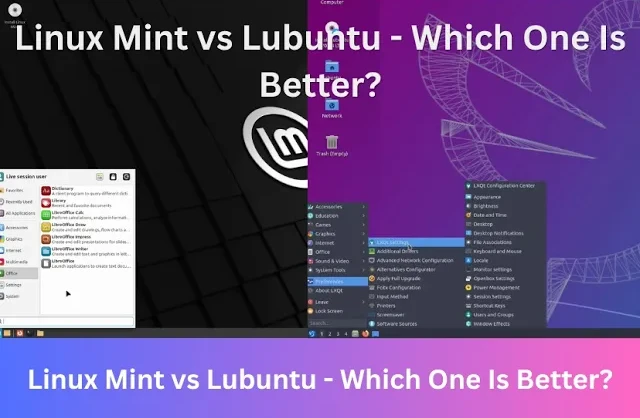
If you're trying to restore an old PC, both Linux Mint and Lubuntu are great choices. We compare two of the best Ubuntu-based distributions. We test both distros on usability for beginners, performance and resource usage, customisation, and software availability.
Setup and Ease Of Use
Linux Mint is generally more suitable for beginners and users moving from Windows due to its polished, familiar interface and full-featured out-of-the-box experience. It's designed to resemble the classic Windows layout with the taskbar, start menu, and status icons on the right hand side, making the transition from Windows 7, 10, or 11 straightforward and avoiding the unconventional layout of some other Linux distros. Most tasks, including driver installations and system updates, can be handled through graphical interface, reducing the need to use the command line.
Lubuntu is still quite user-friendly and easy to navigate for those coming from Windows. As a lightweight edition of Ubuntu, it still offers a simple, traditional interface, the installation process is straightforward with a guided installer, and community support is strong. However, some users might find the default theme to be a bit basic compared to modern operating systems.
System Tools and Software Availability
Mint includes a wide variety of ready-to-use applications, including LibreOffice, GIMP, a comprehensive Software Manager, and Firefox, while Lubuntu uses ultralight apps, such as Featherpad and requires more manual software installation. If you prefer a barebones, lightweight system and don't mind a slightly steeper learning curve for configuration, Lubuntu is still great.
Linux Mint focuses on out-of-the-box usability, including easy setup for multimedia codecs, printers, and proprietary drivers and includes polished, built-in tools like the Update Manager and Timeshift that simplify maintenance without requiring the command line. Unlike Lubuntu, Mint doesn't use snap packages by default, resulting in a faster Software Manager.
However, Lubuntu is an official Ubuntu flavor, so it has access to the massive Ubuntu software repositories, meaning you can easily install software via the Discover software centre.
Customisation Options
Linux Mint generally offers more out-of-the-box customisation options than Lubuntu, particularly in its Cinnamon edition. While both are based on Ubuntu and can technically achieve similar results with enough effort, they focus on different goals. Mint focuses on a polished, traditional Windows-like desktop that is easy to tweak visually. You can change themes, icons, and window borders directly through system settings without any third-party tools. Linux Mint also allows you to customise the desktop environment directly, such as right-clicking on desktop items to configure them.
Lubuntu prioritises speed over aesthetics, using the LXQt desktop environment to run efficiently on older, low-spec hardware. Despite being lightweight, it's still customisable. The LXQt desktop environment allows you to change themes, icons, fonts, and cursors, as well as configure panel positioning. While it's possible to change themes and customise the panel, it lacks the built-in app store style customisation tools found in Mint. It uses Qt technologies, which are very light, but some users find it less user-friendly than the tools in Mint.
Performance and Resource Usage
Both Linux distributions are much lighter than Windows 10 and 11, but their performance and resource usage differs. Lubuntu is faster and uses fewer system resources because its LXQT desktop is very lightweight, often using around 500 megabytes of RAM at startup. This makes it ideal for very old computers with 2 gigabytes of RAM and less.
Linux Mint is generally heavier than Lubuntu because of its graphical effects and polished interface, in particular the Cinnamon edition. XFCE can use 600 to 800 megabytes of RAM when idle, while the Cinnamon edition can use over a gigabyte. 4 gigabytes of RAM is generally recommended for a comfortable experience. However, the XFCE edition is designed to be lightweight on older hardware with 2 to 4 gigabytes of RAM. For most users, XFCE provides the best balance of being both lightweight and user-friendly.
Desktop Environments
Linux Mint and Lubuntu differ in their desktop environment choice. Linux Mint has three choices of desktop environments. By default, it uses the Cinnamon edition, which is modern and includes all the features, but can feel heavy on very old hardware. XFCE is available for older hardware and MATE offers a slightly more polished feel that sits between XFCE and Cinnamon in resource usage. Lubuntu uses the LXQT desktop environment, which is lighter. It's designed to be very fast and responsive on low-end hardware, often using less RAM on boot-up than Mint. Both are based on Ubuntu, but their different desktop environments dictate their resource usage and visual appearance.
Should I Use Linux Mint Or Lubuntu?
For most users, we would recommend Linux Mint. It offers a polished, full-featured desktop experience that works immediately, with better tools for beginners. It's designed to be familiar for users switching from Windows and can still run well on old hardware. Lubuntu is better for maximum performance on very old hardware using LXQT. While slightly less polished, it's one of the lightest mainstream Linux distros and it will be noticeably faster on computers with 2 gigabytes of RAM or less.
Comments
About Us
-
We offer guides, tutorials, and reviews about the world of information technology. Whether you're a tech enthusiast, a professional, or a beginner, our goal is to inspire you and guide your tech journey. Subscribe to stay updated with the latest videos and explore the exciting world of computing and information technology.
Recent Articles


Recent Quizzes
Subtopics
Network Services Network Setups Network Standards Network Hardware Network Identifiers Network Software Internet Protocols Internet Organisations Data Transmission Technologies Web Development Web Design Web Advertising Web Applications Web Organisations Web Technologies Web Services SEO Threats To Systems, Data & Information Security Mechanisms & Technologies Computer Hardware Computer Software Ethics & Sustainability Legislation & User Data Protection