Linux Mint vs Ubuntu - Which One Is Better?
Date First Published: 16th March 2026
Whether you're new to Linux or looking for a change, the Linux Mint vs Ubuntu debate is well known. While both are built on the same foundation, they offer quite different experiences. In this video, we break down the interface, performance, customisation options, and software management to help you decide which operating system deserves a spot on your hard drive.
1. User Interface and Layout
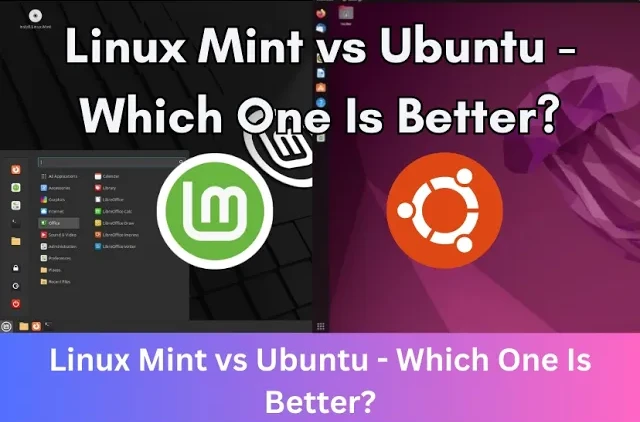
Linux Mint offers a traditional, Windows-like experience. It has a bottom taskbar, desktop icons, and a simple start menu. It's designed to be familiar for people moving from Windows. Ubuntu uses a vertical dock on the left for apps, a top panel for status, and a full-screen overview for searching apps, similar to a hybrid of macOS and mobile interfaces. Mint is more beginner-friendly, while Ubuntu emphasises modern features, like search-based navigation and workflow management.
2. Desktop Environment Choices
Linux Mint is based on the cinnamon desktop and offers lightweight options, including MATE, and XFCE. Cinnamon is recommended for most new users. It offers a polished interface with a taskbar, start menu, and high customisability through themes, applets, and extensions. It's best suited for modern hardware, requiring more resources than the MATE or Xfce editions.
The MATE desktop environment is based on the classic GNOME 2 interface, serving as a middle-ground option between the modern Cinnamon and lightweight XFCE editions. It has fewer advanced desktop effects, animations, or specialised configuration tools.
XFCE is the most lightweight and simple desktop. It has a more classic look and lacks the fancier desktop effects. While it doesn't support as many features as Cinnamon, it's the lightest on system resources and ideal for older computers.
Ubuntu uses a customised version of the GNOME desktop environment by default. It features a specialised left-side dock and top panel, designed to be modern and intuitive. While GNOME is the default for the main version, other versions exist, such as Lubuntu or Kubuntu, which are designed for low-resource hardware. You can easily install and switch to other desktop environments without reinstalling the system.
3. Speed and Performance
Linux Mint is generally faster than Ubuntu on older or lower-power hardware with shorter boot times and better responsiveness, allowing older processors to operate without overloading. It uses fewer system resources, including memory, disk space, and processing power, especially the XFCE and MATE editions. While Ubuntu offers high-performance on modern systems, the interface is more demanding. Ubuntu uses the heavier GNOME desktop, which requires more memory and advanced graphics and can slow down older computers. The speed and performance differences between Linux Mint and Ubuntu will likely be noticeable on older hardware.
4. Customisation Options
Linux Mint offers out-of-the-box customisation with the Cinnamon desktop, allowing users to change themes, panels, and layouts directly through settings without third party tools. The MATE and XFCE editions are also customisable, but offer fewer visual effects than the Cinnamon desktop. Ubuntu based on the GNOME environment is still customisable but requires extra tools like GNOME Tweaks or extensions to achieve similar levels of desktop customisation. Customising Ubuntu generally requires more effort than Linux Mint. If your priority is a familiar, easy-to-tweak, traditional desktop, Linux Mint Cinnamon is the more straightforward choice. If you prefer a modern interface and don't mind installing extensions, Ubuntu is also capable.
5. Software and App Stores
While both are built on the same Ubuntu base and can share the same repository of software, the user experience within their respective software stores is different. Linux Mint focuses on Flatpak and native packages, while Ubuntu strongly pushes its proprietary Snap package format.
The Ubuntu store is designed by Canonical and favours Snap packages. Even when you install a standard application, like Firefox or Chromium, Ubuntu often installs the Snap version, which can have slower startup times and larger file sizes. The Software Center can be slower to load and sometimes feels bloated due to its integration with the Snap Store. It includes more commercial apps and recommendation engines, which sometimes pushes proprietary technology over open source alternatives.
The Linux Mint software manager intentionally blocks or disables Snap packages by default. Instead, it has built-in support for Flatpaks and prioritises native .deb packages. The Software Manager is generally considered faster, lighter, and more responsive. It provides a cleaner interface that focuses on localising application choices and ensuring better integration with the Cinnamon desktop environment.
6. Updates
Linux Mint features a dedicated Update Manager that lets users select update types and categorises them by stability levels. It encourages using Timeshift for backups, making it easier to revert if an update causes issues. Ubuntu provides automated, frequent updates with a focus on snaps and modern software. Mint allows users to explicitly pick and choose which kernel version to update to, providing more control, whereas Ubuntu generally updates to the latest available kernel automatically. Linux Mint prioritises stability, often holding back certain updates that might be considered unstable. Ubuntu, having two major releases per year, tends to provide more frequent updates and later software packages, which can sometimes lead to instability.
7. Should I Use Linux Mint or Ubuntu?
Both are great choices, but they're designed for different kinds of users. Choose Linux Mint if you want a familiar, Windows-like interface that's lightweight and works perfectly out-of-the-box, especially on older hardware. It's ideal for beginners, users migrating from Windows, and those who prefer a traditional desktop layout. Many people consider it as Ubuntu done right as it focuses on stability without forcing new, controversial technologies like snap packages.
Choose Ubuntu if you prefer a more modern, vertical, search-based workflow, want to work with the official company-backed version, or want the latest software. It's better for users who want to try a modern workflow or work in professional development environments that rely on Canonical’s corporate support. While Ubuntu is efficient on modern hardware, Linux Mint is better optimised for older computers or systems with limited resources.
Comments
About Us
-
We offer guides, tutorials, and reviews about the world of information technology. Whether you're a tech enthusiast, a professional, or a beginner, our goal is to inspire you and guide your tech journey. Subscribe to stay updated with the latest videos and explore the exciting world of computing and information technology.
Recent Articles


Recent Quizzes
Subtopics
Network Services Network Setups Network Standards Network Hardware Network Identifiers Network Software Internet Protocols Internet Organisations Data Transmission Technologies Web Development Web Design Web Advertising Web Applications Web Organisations Web Technologies Web Services SEO Threats To Systems, Data & Information Security Mechanisms & Technologies Computer Hardware Computer Software Ethics & Sustainability Legislation & User Data Protection