Zorin OS - Is It A Good Choice For Beginners?
Date First Published: 9th August 2026
Zorin OS is a user-friendly, Windows-like Linux system designed for beginners. This video explores its features, ease of use, app support, and performance to see if it truly helps people switch from Windows or macOS without difficulty.
Setup and Installation
The setup and installation is generally simple and very suitable for beginners. The process uses a graphical installer that guides you through every step, including the keyword layout, language selection, partitioning, and user profile with clear prompts, making it just as straightforward to install as Windows. Before starting, you will need a blank USB flash drive with at least 8 gigabytes of storage space, an ISO file downloaded from the Official Zorin OS website, and a flashing tool, like Rufus or Balena Etcher to put the installer on your USB drive. To ensure your components work correctly, you will need to opt to install third-party drivers for graphics and hardware.
Before installing Zorin OS, you can easily test it. You can run it in Live Mode from a USB drive and the system will run completely from the USB memory, leaving your hard drive and current files untouched. Any changes you make won't be saved once you shut down or restart your PC.
Windows-Like Layout
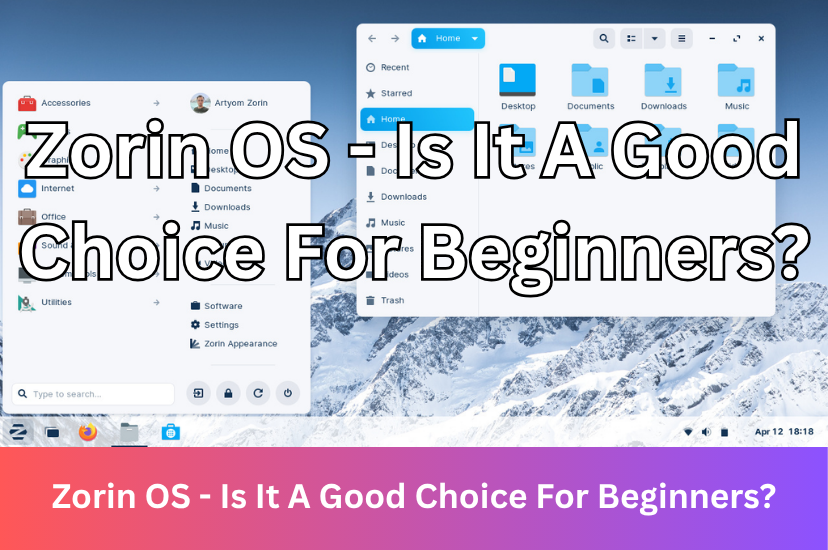
Zorin OS is specifically designed from the ground up to feel familiar and comfortable for users transitioning from Windows. It features a classic taskbar, a familiar start menu layout, and a system tray that closely mimics the Windows environment to reduce the learning curve for beginners.
Zorin OS includes a built-in appearance tool that lets you change the taskbar and menu layout to match Windows 10 or Windows 11 out of the box. You can switch between light and dark modes and change icon sets. It's not designed to look exactly the same as Windows 10 or Windows 11, but the desktop layout will feel familiar. In the free version, you will find around 4 basic Windows-like layouts. The pro version adds extra premium layouts, including a dedicated ChromeOS and Windows 11 layout with centred taskbar icons and a modern start menu. It uses the gnome desktop environment by default for its Core and Pro editions and you can install custom themes from the software centre, so you're not limited to using the pre-built themes in Zorin OS.
Software Manager
Zorin OS has a built-in software manager. It's not a custom-coded standalone utility from scratch. It's a customised version of gnome software that comes pre-configured to combine multiple software sources. You can open it in the Zorin menu to install and update apps in the visual store. It supports native APT packages, Flatpak, and Snap stores out of the box. It's suitable for beginners because it's presented in a visual interface and doesn't require using the terminal. It can even suggest alternative apps that can run natively on Linux when you try to run Windows application files.
Zorin OS Lite
Zorin OS offers a lite edition which uses the XFCE desktop environment. It's designed to conserve resources on older hardware by using fewer visual effects and animations. There are fewer pre-installed apps, background processes, and features like advanced window tiling and Zorin Connect out-of-the-box are left out to save RAM. Zorin OS Lite is being discontinued after the Zorin OS 18 series because standard versions are optimised to run on computers with as little as 1.5 to 2 gigabytes of RAM, which closes the performance gap that previously required a lightweight edition and the team wants to focus more on providing a single gnome desktop experience rather than splitting resources across multiple desktop environments. It can still be installed and it remains fully supported and updated through the Zorin OS 17 and 18 release series until June 2029. Advanced users can still manually install the stock XFCE desktop environment from official repositories.
Zorin OS Core vs Pro
Zorin OS has two versions. These include the Core and Pro versions. The Core version includes standard basic desktop layouts and essential apps, like Firefox and LibreOffice. It's suitable for everyday use, web browsing, and basic productivity. The Pro edition offers eight additional premium desktop layouts, mimicking macOS, Windows 11, and ChromeOS, and pre-installs an advanced suite of professional creative, productivity, and media software. It also includes direct installation support from the Zorin development team. While Zorin OS core is a fully functional operating system, seeing locked features available in Zorin OS Pro can confuse beginners because they often expect an open-operating system, like a Linux distribution, to include all visible tools out of the box.
Heavier Desktop
Zorin OS uses far fewer system resources than Windows and can run smoothly on most computers. However, it's heavier than lighter alternatives, like Xubuntu, Linux Mint XFCE, or Lubuntu. Even when comparing Zorin OS Lite, Zorin consumes more RAM and processing power because of heavy custom themes, animations, and pre-installed aesthetic layers to make it mimic Windows. It packages more tools, custom branding, and a tailored software centre. This makes it easier for beginners, but if you're a power user who wants to conserve system resources on older or low-spec hardware, a lighter alternative would be a better choice.
Is Zorin OS A Good Choice?
We would recommend Zorin OS for most beginners, especially for people transitioning from Windows. It offers a familiar interface, a built-in software store, and pre-installed daily tools so you rarely need to use text commands. The desktop looks and acts like Windows out of the box, featuring a similar taskbar and start menu and it includes the Zorin Software Center, which works just like an app store on a phone or Windows. You can handle normal daily tasks, updates, and app installs entirely through graphical menus.
For power users, Zorin OS is not the ideal choice. It's designed as a polished, user-friendly entry point for beginners and people migrating from Windows or macOS, rather than a customisable system for advanced workflows. Its locked-down interface and heavy reliance on pre-configured wrappers get in the way of deep system tweaking. Alternatives, like Kubuntu, Xubuntu, or Debian with KDE or XFCE would be a better choice if you're an advanced user who likes to tweak the system.
Comments
About Us
-
We offer guides, tutorials, and reviews about the world of information technology. Whether you're a tech enthusiast, a professional, or a beginner, our goal is to inspire you and guide your tech journey. Subscribe to stay updated with the latest videos and explore the exciting world of computing and information technology.
Recent Articles

Recent Quizzes
Subtopics
Network Services Network Setups Network Standards Network Hardware Network Identifiers Network Software Internet Protocols Internet Organisations Data Transmission Technologies Web Development Web Design Web Advertising Web Applications Web Organisations Web Technologies Web Services SEO Threats To Systems, Data & Information Security Mechanisms & Technologies Computer Hardware Computer Software Ethics & Sustainability Legislation & User Data Protection